Every homebrewer who keeps brewing long enough goes through the same labeling evolution. It looks something like this — and most of us pretend the next step won't be necessary, right up until it is.
Here's the upgrade path, what it gets you, what it costs you, and where you actually want to end up.
Stage 1: Sharpie on the Keg
The first batch goes into a keg. You write "Saison" on the side with a Sharpie.
It works. Mostly.
Then you tap the saison, and a friend asks what's in it. Style? ABV? When did you brew it? You don't remember. The Sharpie isn't going to tell you.
Two months later, the saison is gone, but the Sharpie won't come off without serious scrubbing. Your next batch — a stout — is now labeled "STOUT (was Saison)" because you couldn't be bothered.
Cost: Free. Verdict: Works for one keg, falls apart at three.
Stage 2: Masking Tape Labels
You upgrade. Strip of masking tape on each keg, written in pen. When you switch beers, you peel and replace.
This is genuinely better. You can write more — name, style, OG, ABV, the date you kegged it. It comes off cleanly.
But the labels still face the wrong way half the time. Your friends still have to walk over and squint at the keg to read it. And nobody wants to be the person who lifts the keezer lid mid-conversation just to check the IBU.
Cost: ~$3 for a roll of tape. Verdict: A real improvement. Adequate for a single keezer with one drinker.
Stage 3: Chalkboard
This is the stage where the homebrewing hobby starts to feel like a real hobby. You buy or make a chalkboard. Maybe it's framed in reclaimed wood. Maybe it's a slate-painted section of wall. Either way, your bar suddenly looks like a bar.
You write your tap list with a chalk pen. It looks great. Photos for Instagram. Friends are impressed.
Then you tap a new keg. You have to wipe down the chalkboard, rewrite everything, and fix the bits where the old letters ghosted. You misspell "Hefeweizen" again. The IBU number for the IPA is wrong because you reused last month's number by accident.
When you swap a keg mid-party, you stop the music to find a chalk pen. The chalkboard stays wrong for an hour.
Cost: ~$30-100 for the chalkboard, plus ongoing chalk markers. Verdict: Looks great. Updating it is friction, and friction means it's wrong half the time.
Stage 4: Printed Paper Menu
Spreadsheet → laminator → clipboard. Or a fancy framed insert.
The text is sharp. You can include details: brewery (you), batch number, IBU, OG, FG, food pairings, ABV. Everything you couldn't fit on a piece of tape.
But now every keg swap means: open Excel, edit the row, print, trim, swap the print into the frame. Five minutes of fiddling. So you only update it when you tap multiple kegs at once. Most of the time, it's wrong.
You also start noticing how cheap "printed and laminated" looks compared to a chalkboard. The aesthetic gain you got in Stage 3 is gone.
Cost: ~$50 for a frame, ongoing printer ink. Verdict: Information-rich, aesthetically downgraded, painful to update.
Stage 5: TV With a Slideshow
The first attempt at digital. You make a Google Slides deck or a PowerPoint. Each tap is a slide. You hook it up to a TV in the kegerator area and let it cycle.
This almost works. It looks modern. It's readable from across the room.
But you still have to edit the slides every time anything changes. The format breaks the moment you want to add a new tap. The TV needs a Chromecast or HDMI cable. The slideshow eventually disconnects, falls behind, or shows the screensaver instead.
You start dreading keg swaps because you also have to fight Slides every time.
Cost: TV you already had + ~$30 Chromecast. Verdict: Looks good. Maintenance is even worse than the printed menu.
Stage 6: Digital Tap List (Where You Actually Want to End Up)
Eventually someone — usually a homebrewer who codes for a living — gets fed up and wires the whole thing together.
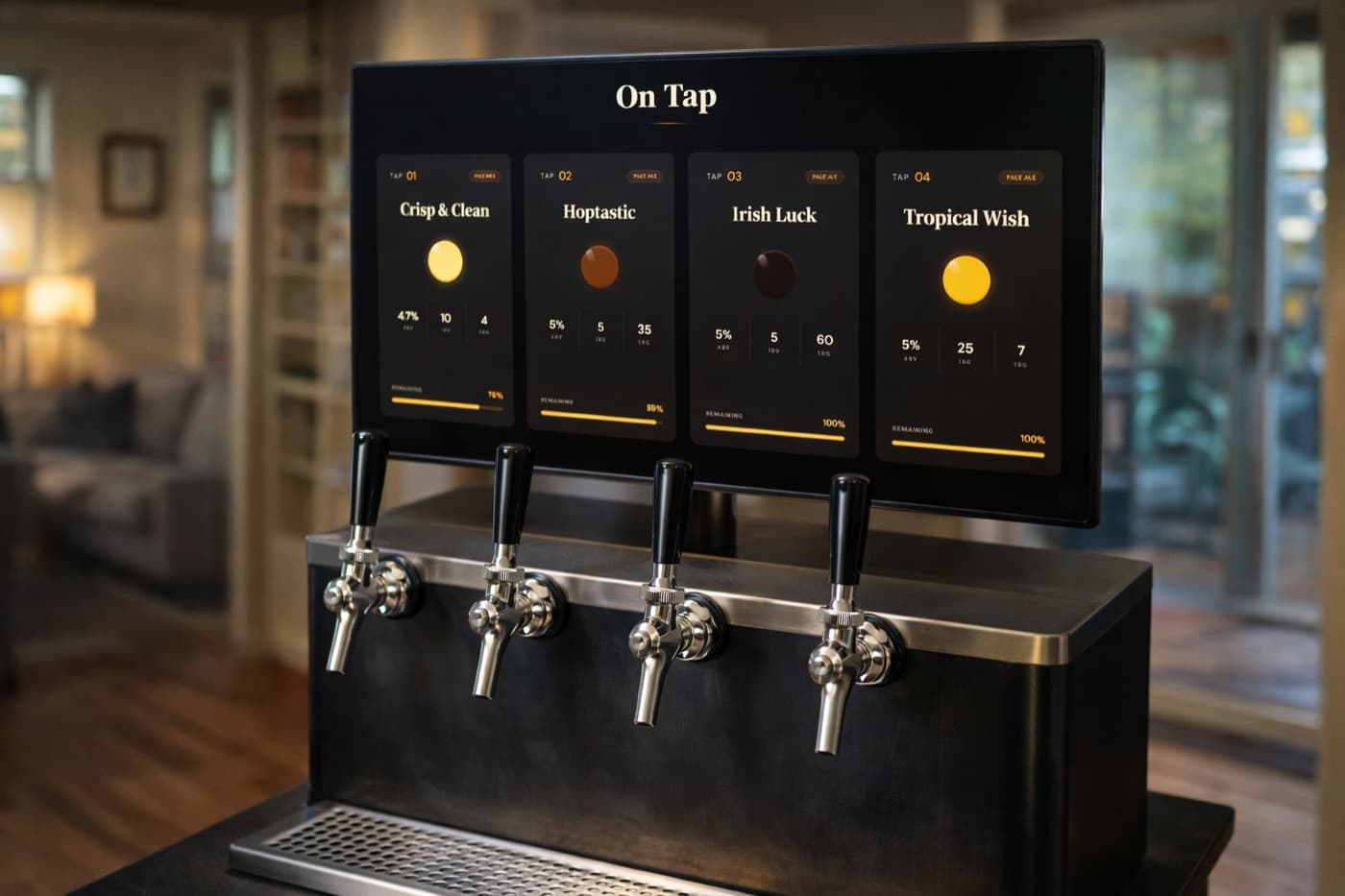
The keg list lives in software. The display reads from that list automatically. Swapping a keg means updating one record in an app on your phone. The screen reflects it instantly.
That's the destination. You can build it yourself (a Raspberry Pi running a custom dashboard is a fun project) or use Keggio and skip the build.
What you get at this stage that you couldn't get before:
- Update from your phone in 10 seconds. No spreadsheet, no chalk, no printer.
- Information density without clutter. Style, ABV, IBU, OG, FG, batch notes — all visible, none of it cramped.
- Live keg levels. Add a flow meter and you stop guessing what's left.
- A share link for friends. They check before they come over.
- A record of every batch. Two years from now, you can look up exactly what your "Citra IPA, Spring 2024" was — recipe, ABV, what people thought.
The cost is the same as Stage 5 (a screen plus a Chromecast or tablet) but the friction drops to zero. Most homebrewers who land here say the same thing: I should have done this three batches ago.
Why Most People Stay at Stage 3
The honest reason most homebrewers don't reach Stage 6 isn't cost — it's the assumption that "doing it properly" requires either a coding project or buying a $2000 commercial system.
Neither is true anymore. The free tier of Keggio covers a single tap. Adding kegs takes a minute each. Pointing a tablet at the display URL is one step. The whole upgrade — from "Sharpie that says STOUT" to "professional-looking digital tap list with live keg levels" — costs less than a chalkboard and takes less time than printing one paper menu.
You don't need to be a hobbyist software engineer. You don't need to buy a smart kegerator. You just need to stop reaching for the Sharpie.
What to Do With Your Old Setup
Don't throw out the chalkboard. The best home bars use both — a digital tap list as the primary, source-of-truth display, and a chalkboard for style: featured beer of the week, brewing milestones, "RIP Saison 04/2026." The digital handles information. The chalkboard handles personality.
The Sharpie can go in the trash, though.