Your Taps, On Display
Manage your kegerator, track your kegs, and show your guests what's on tap — all from a browser.
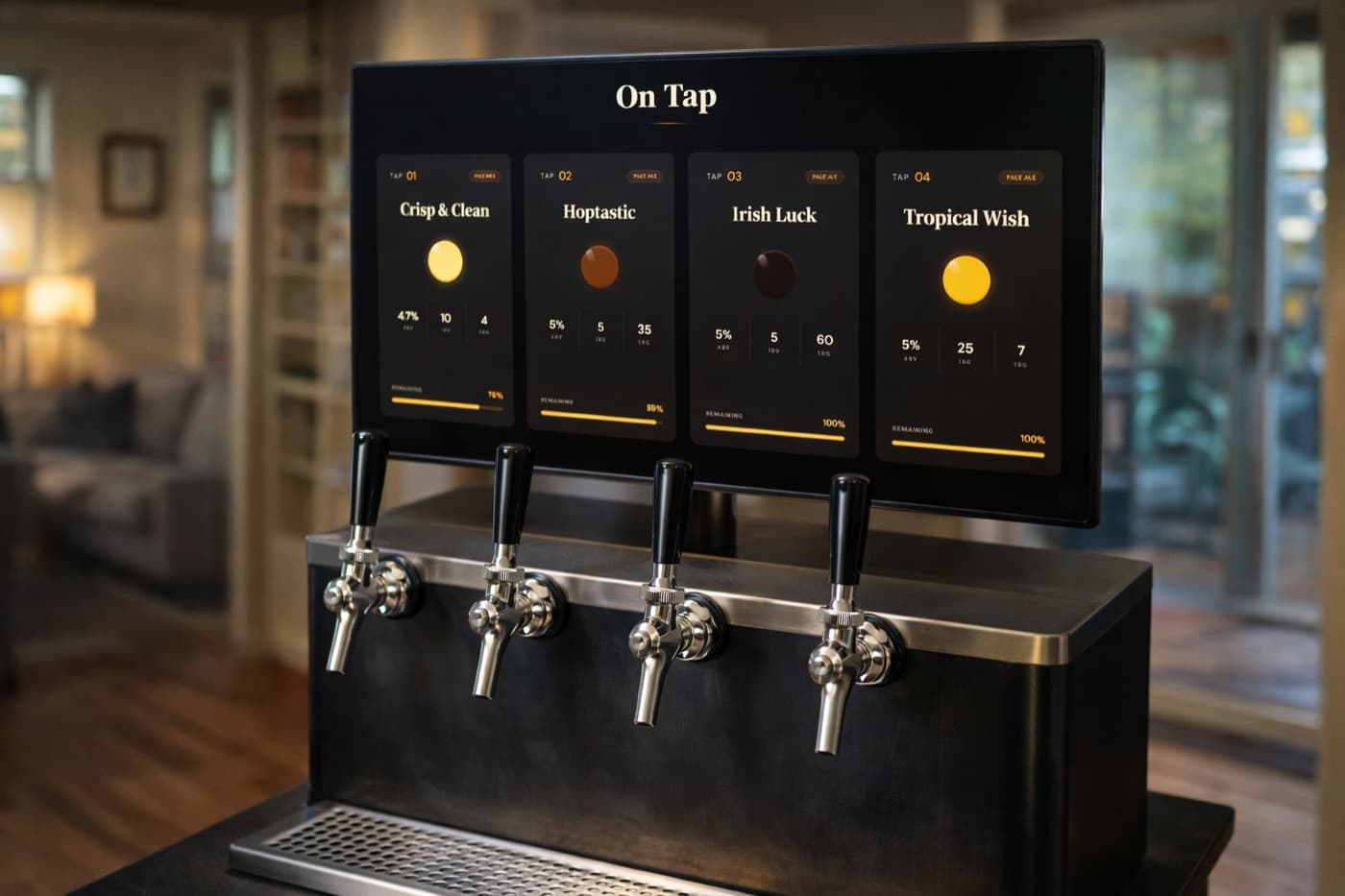
Mount a screen and show your guests what's pouring
What Keggio actually does
Keggio is a kegerator app with two halves. The first is a private side where you record what you have on tap: the beer, its style, ABV, IBU and colour, which keg it's in, and how full that keg is. Every pour you log comes off the keg level, so you always know what's left without lifting anything or guessing from the sound.
The second half is the part your guests see — a digital tap display that runs in a browser tab on any screen you can mount near the kegerator. It replaces the chalkboard, the masking tape, and the Sharpie labels on the keg lids. When you swap a keg, you edit it on your phone and the display updates itself.
There is no hardware to buy and nothing to install. If you already have flow meters on your lines, the Keggio API can register pours for you; if you don't, tapping the card on the screen works fine and is what most people do.
The display, live on this page
These three cards are the real display component, not a screenshot. Beer colour comes from the EBC value and the bar underneath is the keg level.
Sunlit Pilsner
Czech Pilsner
Crisp Saaz hop bite with a soft malt finish.
Keezer Pale Ale
American Pale Ale
Cascade and Centennial over a clean pale base.
Third Shift Hazy
New England IPA
Citra and Mosaic, oats, and a pillowy mouthfeel.

Open the full six-tap demo to switch between all five themes.
Three ways people use it
Homebrew keezer
Four to six of your own batches on tap at once. Each keg shows style, ABV, IBU and colour, with a live level so you can see which one is about to kick. More for homebrewers.
Home bar or garage
A single-tap kegerator with a commercial keg on it, and a screen that makes the basement bar look like a real one. This is what the free plan is for — one tap, no expiry.
Small taproom
A rotating tap list that staff update from behind the bar, on more than one screen, without reprinting anything. More for breweries.
How it works, in three steps
Sign up free
Email and password, no credit card. The free plan covers one tap forever.
Add your kegs
Beer name, style, ABV, IBU, colour and keg size — then map each keg to a tap.
Open the display
Load the display URL on a TV, tablet or spare laptop near the kegerator. Done.
Getting your kegerator dialled in
The two questions every new kegerator owner runs into, answered properly.
CO2 pressure settings for every beer style →
Why the same PSI gives you foam on one beer and a flat pint on the next, and how to dial in carbonation and serving pressure separately.
How long does a keg last? →
The real math behind days-to-empty by keg size and pour size — and the separate question of how long the beer stays good once tapped.
Common questions
Do I need special hardware?▾
No. Keggio runs in your browser — a TV with a Chromecast or Fire Stick, a tablet, or an old laptop is all you need. If you have flow sensors on your lines, you can use the Keggio API to register pours automatically instead of tapping the screen.
Is there a free plan?▾
Yes. The free plan includes one tap, pour tracking, and the default tap display theme. It has no time limit and does not need a credit card. Paid plans add more taps, extra themes, and multiple displays.
Can I see it before signing up?▾
Yes. The live demo shows a real six-tap display with keg levels and all five themes, with no account and no email required.
Does it work for a keezer or a multi-tap kegerator?▾
Yes. Each tap gets its own beer, keg and live level, and the display lays itself out automatically for the number of taps you have — from a single-tap kegerator up to a taproom wall.
How do I update what's on tap?▾
Edit the tap from your phone or laptop. The display picks up the change within seconds, so you never have to walk over to the screen or refresh anything.
Put your tap list on a screen
Free for one tap, no credit card. Or look at the demo first — it takes ten seconds and needs no account.