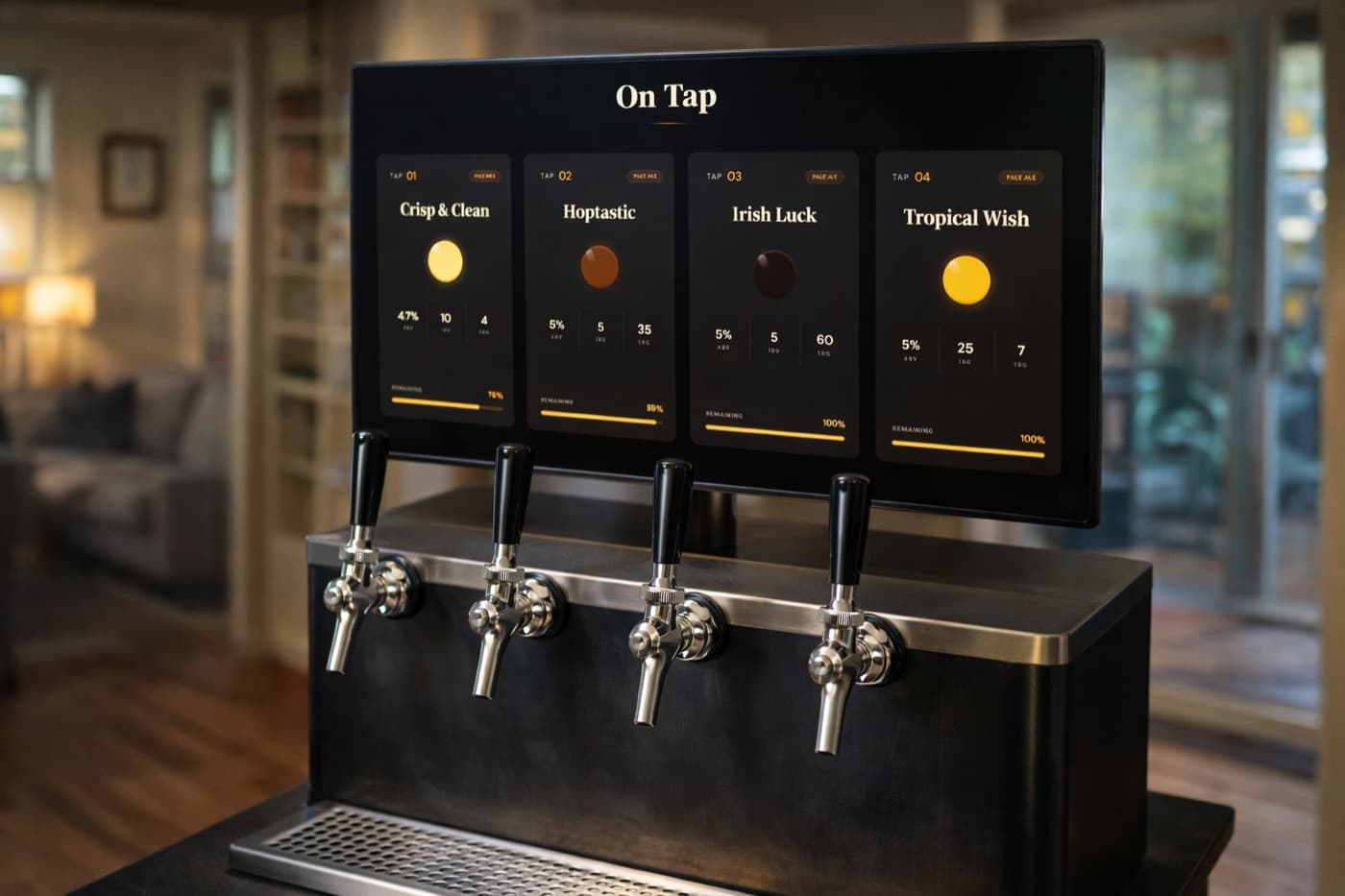
You don't need a $2,000 "smart kegerator" to know what's on tap, how much is left, and when your beer is the right temperature. Any kegerator — pre-built, converted chest freezer, or DIY keezer — can be upgraded without replacing the unit itself.
Here's how to add intelligence in layers, from "software only, ten minutes" all the way to a full IoT build.
What "Smart" Actually Means Here
A smart kegerator doesn't need a touchscreen on the front or an app from the manufacturer. It just needs to answer four questions without you opening the door:
- What's on each tap? (so guests know, and you don't have to remember)
- How much is left in each keg? (so you can plan your next brew)
- What temperature is it running at? (so you catch problems before they ruin a batch)
- Has anyone poured today, and how much? (useful for analytics, more useful for "did I leave the tap open?")
Every layer below answers more of these. Pick the level that fits your patience and budget.
Layer 1: Software Only (Free, 10 Minutes)
If all you do is sign up for Keggio and add your kegs manually, you've already solved questions 1 and (sort of) 2.
You log a pour roughly when you pour. The keg level decreases. After a couple of weeks, your pours stay accurate within ~10% — close enough to know when you're getting low.
What you get:
- Tap list visible on any phone or screen
- Keg level estimates based on logged pours
- Tasting notes attached to each batch
- A read-only tap display you can mount near the kegerator
Cost: $0 (free plan supports one tap forever).
Limitations: You have to remember to log pours. Most people stop after a week, then estimates drift.
This is plenty for a single-tap home setup. If you stop reading here, you've already upgraded your kegerator. But the next layer is where it gets fun.
Layer 2: Flow Meters (Auto Pour Logging)
Adding a flow meter to each beer line means every pour gets logged automatically. You never lift the keg to guess again.
Hardware options:
| Sensor | Cost | Accuracy | Notes | |---|---|---|---| | Swissflow SF800 | ~$100 | ±2% | Industry standard, robust, food-safe | | Hall-effect FT-330 | ~$15 | ±5% | Cheap, plastic, good enough for home | | YF-S401 | ~$8 | ±10% | Bargain bin. Works, but calibrate it carefully |
For a home kegerator, the FT-330 is the sweet spot — accurate enough, cheap enough that buying one per tap doesn't hurt.
Where it goes:
Install the flow meter inline on the beer line, between the keg and the faucet. The flow direction matters — most have an arrow on the body. Use 3/16" barbed fittings to match standard home-bar tubing.
The signal:
Hall-effect flow meters output a pulse signal — typically ~485 pulses per liter for the FT-330. You need a microcontroller to count those pulses and report them.
Layer 3: A Microcontroller Brain (ESP32)
An ESP32 ($6) reads the flow meter pulses, counts pours, and sends them over WiFi to Keggio's API. One ESP32 can handle 4-6 flow meters comfortably.
Wiring per flow meter:
FT-330 pin    →    ESP32
─────────────────────────
Red (VCC)     →    5V
Black (GND)   →    GND
Yellow (Sig)  →    GPIO (any input pin)
Minimal Arduino sketch:
#include <WiFi.h>
#include <HTTPClient.h>

const int FLOW_PIN = 4;
volatile int pulseCount = 0;
const float PULSES_PER_LITER = 485.0;

void IRAM_ATTR pulseISR() { pulseCount++; }

void setup() {
  WiFi.begin("your-ssid", "your-password");
  pinMode(FLOW_PIN, INPUT_PULLUP);
  attachInterrupt(FLOW_PIN, pulseISR, RISING);
}

void loop() {
  delay(2000);
  if (pulseCount > 50) {  // ~100ml threshold
    float liters = pulseCount / PULSES_PER_LITER;
    pulseCount = 0;
    sendPour(liters);
  }
}

void sendPour(float liters) {
  HTTPClient http;
  http.begin("https://api.keggio.com/v1/pours");
  http.addHeader("Authorization", "Bearer YOUR_API_KEY");
  http.addHeader("Content-Type", "application/json");
  String body = "{\"tap_id\":\"tap_1\",\"volume_ml\":" + String(liters * 1000) + "}";
  http.POST(body);
  http.end();
}
That's the entire smart-kegerator firmware. Roughly 30 lines. The Keggio API receives the pour, decrements the keg level, and updates the display in real time.
Pulse threshold matters. Set it too low and you'll log every drip. ~50 pulses (around 100 ml, half a small pour) filters out drift while catching real pours.
Layer 4: Temperature Monitoring
Adding a DS18B20 1-wire temperature sensor ($3) to your ESP32 lets you also report kegerator temperature.
#include <OneWire.h>
#include <DallasTemperature.h>

OneWire wire(15);
DallasTemperature tempSensor(&wire);

float readTemp() {
  tempSensor.requestTemperatures();
  return tempSensor.getTempCByIndex(0);
}
Report it once a minute. If your kegerator drifts above 8°C/46°F, get an alert. Cheap insurance against a failed compressor ruining four kegs.
Layer 5: A Tap Display
Now that the data is flowing in, point a screen at it. Cheapest path: an old tablet running Keggio's display URL in kiosk mode. Mount it next to the kegerator. The display reflects live pours and keg levels without any extra config.
For the full taproom look, a Raspberry Pi 4 + a wall-mounted TV runs about $80 and looks like real bar signage.
Total Cost Breakdown
| Layer | Hardware Cost | Effort | |---|---|---| | 1: Software only | $0 | 10 min | | 2: Flow meters (4 taps) | ~$60 | 2 hrs install | | 3: ESP32 + wiring | ~$15 | 1 evening | | 4: Temperature sensor | ~$3 | 30 min | | 5: Tablet display | $0-50 | 30 min | | Total (full build) | ~$130 | A weekend |
Compare that to a "smart kegerator" off the shelf: $1,800-2,500, with a proprietary app that won't be maintained in three years. The DIY route uses standard parts, runs on open APIs, and you can swap any component without replacing the unit.
Common Gotchas
Foam through flow meters. Hall-effect sensors count pulses regardless of whether liquid or gas flows past. If your beer is foamy, your meter will over-count. Fix the foam first (line length, pressure, temperature) before trusting pour data.
WiFi range in a metal kegerator. Compressor housings block 2.4 GHz signal. Mount the ESP32 on the outside or near the door, not inside the cooling chamber.
Power loss → lost pulses. ESP32s don't keep state across power cuts. Send pour events in real time, not batched, so a power blip doesn't lose data.
Keg-empty timing. Flow meters report pulses, not "keg empty." Set a low-keg alert at 10-15% and trust it — by the time the meter reports zero, you've already poured a foam glass.
What This Looks Like Wired Up
If you want to see how all of this actually displays — tap list, keg levels, pour history — point a browser at any Keggio tap display. The data from your ESP32 flows in via the API and populates everything you see.
Or start with just the software and add hardware in layers. There's no "wrong" entry point — every layer above the previous one adds value, and you can stop wherever the cost-benefit stops feeling fun.
The whole point of a smart kegerator isn't to look impressive. It's so you stop guessing. Whether you get there with a $0 software signup or a full ESP32 build, the win is the same: you always know what's on tap, how much is left, and that your compressor is still doing its job.